Every ad, brochure, and script — with its approval on file
IRB-Approved Material Library
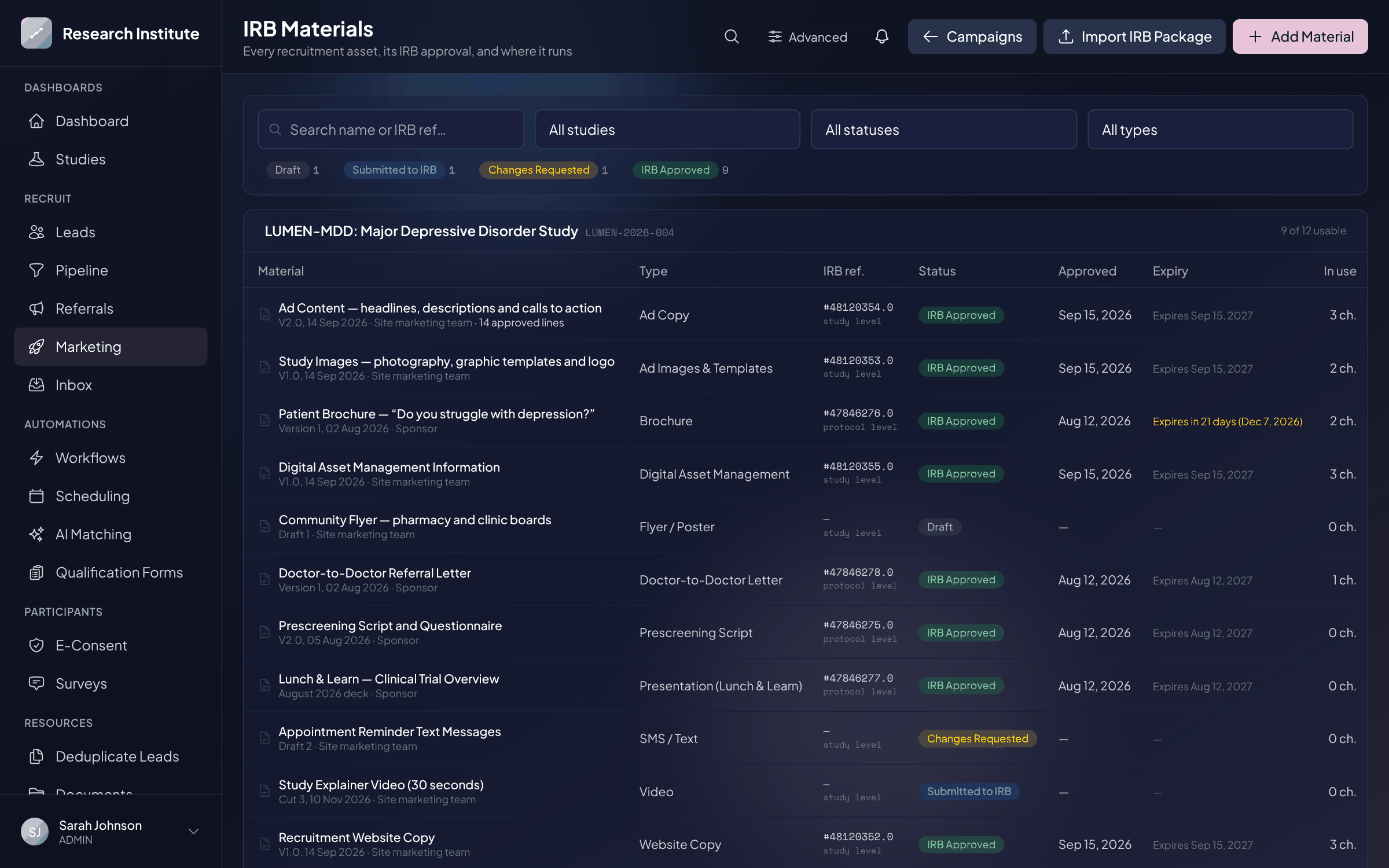
Track the IRB status, reference number, approval date, and expiry of every recruitment material, and make sure each ad runs only on wording that was approved.
What you get
- One record per material: IRB reference, approval level, reviewing IRB, approval and expiry dates
- A review lifecycle — draft, submitted, changes requested, approved, expired, withdrawn — with an append-only history
- Import a whole IRB package at once: names, types, and document numbers read from the stamped files
- An approved copy library with character counts against each ad platform’s limits
- Live ad headlines and body text checked against the approved copy
- Expiry warnings at 30, 14, 7, and 1 day, naming any live campaign that uses the material
- New versions supersede the old one and visibly require re-approval
Why it matters
Recruitment materials have a habit of outliving their approvals. Trialflow keeps one record per reviewed asset — brochure, flyer, ad copy, images, website copy, phone script, physician letter — with its IRB reference, approval level, dates, and the stamped file. Approved ad copy is stored line by line, so ads are assembled from approved wording only, and the headlines and body text of live ads are checked against that library automatically. When an approval is about to lapse, the people running the campaign hear about it first.
See it in action
IRB-Approved Material Library, inside Trialflow
FAQ
IRB-Approved Material Library questions, answered
What counts as a recruitment material?+
Anything the IRB reviewed for recruiting: brochures, flyers and posters, Lunch & Learn presentations, prescreening scripts, doctor-to-doctor letters, ad copy, ad images and templates, website copy and screenshots, video, email, and SMS. Each is tracked per study with its own approval record.
Do I have to enter every approved document by hand?+
No. Drop in the stamped files your IRB portal exported and Trialflow reads the category, title, and document number from each file name, pre-filling a row per document. You set the approval level and date once, adjust anything that needs it, and each file becomes an approved material with the as-approved copy attached.
How does Trialflow know whether an ad uses approved wording?+
Approved ad copy is stored as structured text — headlines, descriptions, primary text, calls to action, offer lines, hashtags, and sitelinks. For connected Google and Meta campaigns, the headlines, descriptions, and body text of the ads that are running are compared against that library, and anything that is not found there is listed on the campaign. Images, sitelinks, and callouts are not visible through the ad-platform feed and still need a manual check.
What happens when an approval is about to expire?+
A daily sweep notifies your team 30, 14, 7, and 1 day ahead, naming any live campaign that runs on the material, and marks the approval expired when its date passes. Losing approval on material a live campaign uses triggers an immediate notification — the ads do not stop themselves, so someone is told to pull them.
Is there an audit trail?+
Yes. Every status change is recorded with who made it, when, a note, and a snapshot of the IRB fields as they stood — so a later edit never rewrites what was approved when. Links made automatically between a material and a running campaign are recorded with the reason.
What happens when a material is revised?+
Upload it as a new version. The previous version is kept as superseded, its campaign links move to the new draft, and the campaign visibly needs re-approval instead of silently losing coverage.
Who can record an IRB decision?+
Coordinators can prepare and submit materials. Recording a decision — approved, expired, or withdrawn — is limited to admins and managers, and marking a material approved requires the IRB reference number.
See IRB-Approved Material Library in action
Get a personalized walkthrough tailored to your studies and therapeutic areas.